Command-Line Interface
reaConverter CLI Usage Guide
reaConverter Pro includes a command-line tool named cons_rcp.exe, located in the reaConverter installation folder.
Quick Start
Convert a single file:
cons_rcp.exe -s "C:\input.jpg" -o "C:\output.png"
Batch convert a folder:
cons_rcp.exe -source_folder "C:\input\" -source_ext heic -dest_path "C:\output\" -dest_ext jpg
Convert with resize:
cons_rcp.exe -s "C:\input.jpg" -o "C:\output.webp" -resize 500x300px qh
Use configuration files:
cons_rcp.exe config.cfg actions.act -f file1.jpg file2.png file3.tiff
Basic Usage
Single file conversion
cons_rcp.exe -s source_file -o output_file
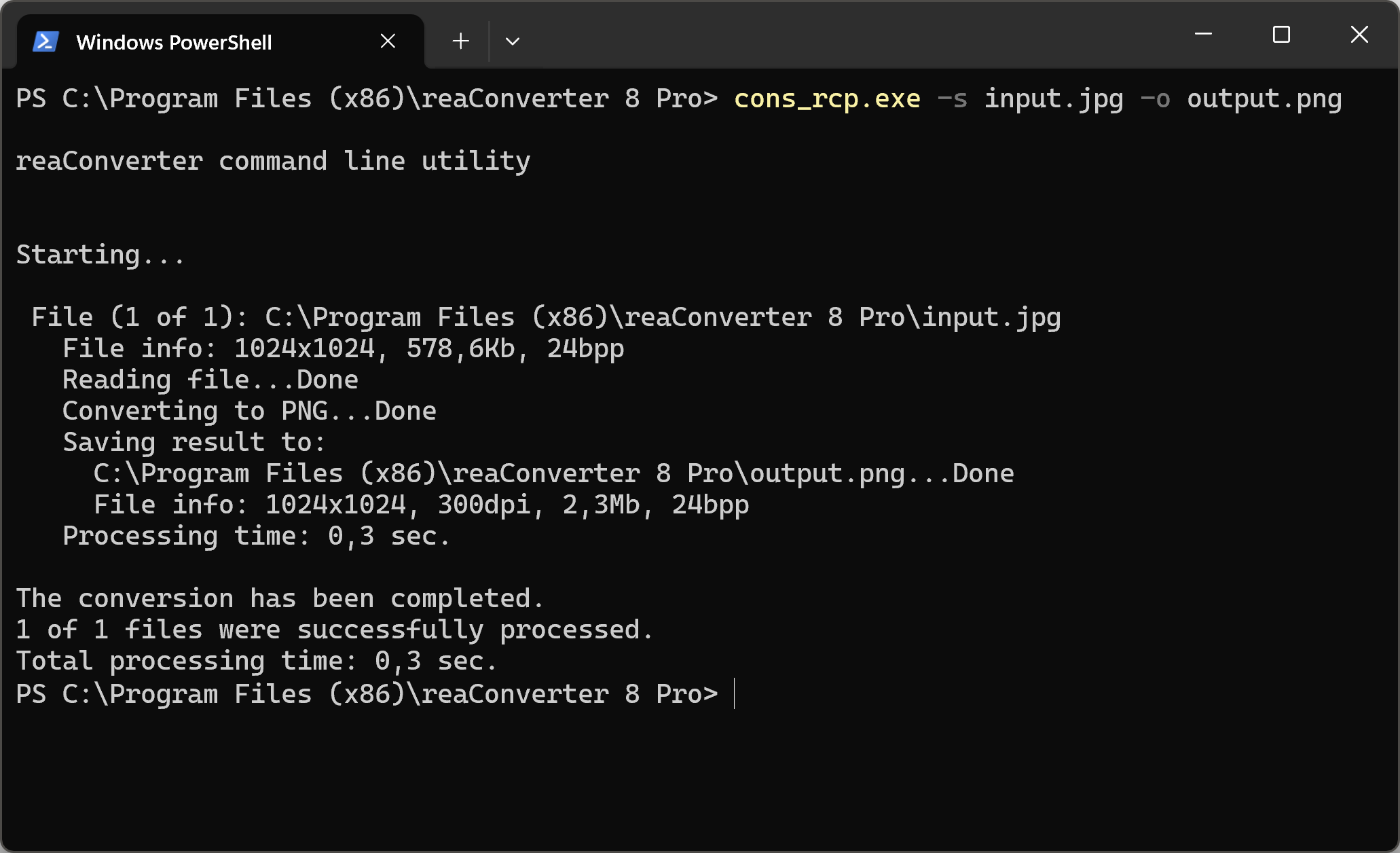
Example — convert JPG to PNG:
cons_rcp.exe -s "C:\Path_to\input_file.jpg" -o "C:\Path_to\output_file.png"
Batch Conversion
Use configuration (.cfg) and action (.act) files for batch processing. Source files are specified with the -f parameter:
cons_rcp.exe cfg_file.cfg act_file.act -f source_file1 source_file2 source_file3
You can also specify parameters directly in the command line:
cons_rcp.exe -s source_file -o output_file [-cfg_param value] [-action param1 param2]
Example — convert with transparency:
cons_rcp.exe -s input_file.png -o output_file.gif -gif_transparent 1 -resize 200x100px qh
Batch HEIC to JPG conversion:
cons_rcp.exe -source_folder "C:\input_folder\" -source_ext heic -dest_path "C:\output_folder\" -dest_ext jpg -jpg_quality 100
Merge multiple images into one PDF:
cons_rcp.exe -f "file1.jpg" "file2.jpg" "file3.jpg" -o "output.pdf" -multipage_option 2
Image Editing
Apply editing actions from an .act file:
cons_rcp.exe -s "C:\input.jpg" -o "C:\output.png" "C:\actions.act"
Or specify actions directly:
cons_rcp.exe -s source_file -o output_file [-action1 param1 param2] [-action2]
Convert and resize:
cons_rcp.exe -s "C:\input.jpg" -o "C:\output.webp" -resize 500x300px qh
Add watermark:
cons_rcp.exe -s "C:\input.jpg" -o "C:\output.jpg" -image_watermark p"C:\watermark.jpg" pos30x30% rot90 mt rgb(66,137,212) t10
Parameter Syntax
Valid parameters follow these rules:
- Parameters start with - (otherwise treated as values)
- Values follow their parameter: -parameter value
- Multiple values: -parameter value1 value2 value3
- Parameters can be in any order
Additional Options
Show file information:
cons_rcp.exe -i "C:\file.jpg"
Save conversion log:
cons_rcp.exe "C:\config.cfg" "C:\actions.act" > "C:\log.txt"
Run silently (no window):
cons_rcp.exe [parameters] /hide
Return Codes
Exit codes for error handling in scripts:
0 - No errors
1 - Configuration file (.cfg) not found
2 - Actions file (.act) not found
3 - Not enough parameters
4 - Internal error (1)
5 - Internal error (2)
6 - Internal error (3)
7 - No files to convert, or file list (.lst) not found
8 - Not all files were converted
Note: Use double quotes for paths with spaces or long file names.
With further questions, please contact our technical support.
Full List of Config Parameters
-source_folder value = string with path to image files you want to be converted (example: -source_folder "d:\source\")
-file_age value = number of days, allows to select files created xx or less days ago (example: -file_age 0 selects files created today)
-source_ext value = string with extension (type) of image files you want to be converted
-file_mask value = string with filename mask of image files you want to be converted (example: -file_mask 1?.*)
-dest_path value = string with path to the destination folder
-dest_subfolder value = string with destination subfolder name
-same_as_source value = 1 if you want to save each converted image file to the its source folder and = 0 if you want to save it to a folder specified in "-dest_path" or "dest_subfolder"
-dest_ext value = string with extension (type) of converted image files
-use_file_list value = string with path to a text file with list of files you want to be converted
-show_transp value = 1 if you want to show/read transparency as a specified color, = 0 otherwise
-transp_red value = red component of specified color (from 0 to 255)
-transp_green value = green component of specified color (from 0 to 255)
-transp_blue value = blue component of specified color (from 0 to 255)
-read_subfolders value =  1 if you want to process files from subfolders of folder defined by "source_folder" parameter and = 0 therwise
-file_size_more value = minimum file size in Kb or Mb to be converted (example: -file_size_more 10Kb or -file_size_more 1Mb)
-file_size_less value = maximum file size in Kb or Mb to be converted (example: -file_size_less 10Kb or -file_size_less 1Mb)
-multipage_loading_option value = 0 if you want to convert every page of multipage files, 1 if you want to convert pages specified in the "Multipage_Loading_pages" option
-multipage_actions_option value = 0 if you want to edit every page of multipage files, 1 if you want to edit pages specified in the "Multipage_Apply_actions_pages" option
-multipage_loading_pages value = list of page numbers you want to convert (example: 1, 3, 5-12)
-multipage_apply_actions_pages value = list of page numbers you want to edit (example: 1, 3, 5-12)
-gif_transparent value = 1 if you want to create transparent GIF files and = 0 otherwise
-gif_auto_transp value = 1 if you want the program to take transparency color in auto mode and = 0 otherwise
-gif_color_red value = red component of transparency color (from 0 to 255)
-gif_color_green value = green component of transparency color (from 0 to 255)
-gif_color_blue value = blue component of transparency color (from 0 to 255)
-gif_interlaced value = 1 if you want to create interlaced GIF files and = 0 otherwise
-gif_delay_time value = animation delay time (1/100s)
-gif_loop value = 1 if you want to loop animated GIF forever and = 0 otherwise
-jxr_quality value = quality for converted JXR files (from 1 to 100%)
-jpg_quality value = quality for converted JPG files (from 1 to 100%)
-jpg_progressive value = 1 if you want to create progressive JPG files and = 0 otherwise
-jpg_color_space value = color model used to create JPG files (0 - YCbCr; 1 - CMYK; 2 - RGB; 3 - YCbCrK; 4 - Gray)
-tif_compression value = compression method used to create TIF files (0 - no compression; 1 - Huffman; 2 - PackBits (RLE); 3 - CCITT Group 3, 1D; 4 - CCITT Group 3, 2D; 5 - CCITT Group 4, 2D; 6 - JPEG; 7 - LZW)
-tif_save_in_cmyk value = 1 if you want to create CMYK TIF files and = 0 otherwise
-tif_jpg_quality value = quality (from 1 to 100%) for JPEG compression
-png_transparent value = 1 if you want to create transparent PNG files and = 0 otherwise
-png_auto_transp value = 1 if you want the program to take transparency color in auto mode and = 0 otherwise
-png_color_red value = red component of transparency color (from 0 to 255)
-png_color_green value = green component of transparency color (from 0 to 255)
-png_color_blue value = blue component of transparency color (from 0 to 255)
-png_interlaced value = 1 if you want to create interlaced PNG files and = 0 otherwise
-png_compression value = level of compression, the value can vary from 0 (no compression) to 9 (best compression)
-png_animated value = 1 if you want to create animated PNG files and = 0 otherwise
-png_delay_time value = animation delay time (1/100s)
-png_optimized value = 1 if you want to create optimized PNG files and = 0 otherwise
-bmp_compression value = 1 if you want to create compressed BMP files and = 0 otherwise
-pcx_compression value = 1 if you want to create compressed PCX files and = 0 otherwise
-tga_compression value = 1 if you want to create compressed TGA files and = 0 otherwise
-jp2_quality value = quality for converted JP2 files (from 1 to 100%)
-file_name_mask value = string with a radical of converted filename, if you set it to then a radical of converted file will be a filename of a source file
-file_name_mask_prefix value = string with a text prefix that will be added to filename of converted files
-file_name_mask_suffix value = string with a text suffix that will be added to filename of converted files
-file_name_start_number value = initial number that will be used to create a filename of converted files
-file_name_replace value = 1 if you want to replace a substring in filename and = 0 otherwise
-file_name_substring_1 value = string to be replaced in filename
-file_name_substring_2 value = string to be replaced with in filename
-file_name_lower_case_ext value = 1 if you want to get converted files with lower case extension and = 0 otherwise
-file_name_case_option value = 0 for no change of converted filenames and = 1 for changing case according to "Case_option"
-file_name_change_case value = 0 for lower case and = 1 for upper case
-multipage_option value = 1 if you want to convert each multipage file to another, = 2 to save all processed files to one multipage file, = 3 to save every page of converted file as a separate file, and = 4 if you want to save group of files to one file
-multipage_group value = number of files in a group (if Option = 4)
-merge_to_one value = 1 to merge vertically, = 2 to merge horizontally (works with -multipage_option 2 only)
-colors_option value = 1 to use output "Bits per sample" and "Sample per pixel" values from original file, = 2 to use optimum values which will be calculated for each converted file, = 3 to define the output color resolution values yourself
-colors_bits_per_sample value = number of bits used to store information about each color channel (from 1 to 8)
-colors_samples_per_pixel value = number of color channels used to store information about one pixel (can be 1 or 3)
-dpi_option value = 1 if you want to copy information about dpi resolution from original file, = 2 if you want to set your own values for dpi resolution
-dpi_x value = horizontal resolution for converted files (from 1 to 10000 dpi)
-dpi_y value = vertical resolution for converted files (from 1 to 10000 dpi)
-copy_alpha value = 1 if you want to copy information about alpha channel (transparency) from original file and = 0 otherwise
-copy_iptc value = 1 if you want to copy IPTC information from original file and = 0 otherwise
-copy_exif value = 1 if you want to copy EXIF information from original file and = 0 otherwise
-exif_title, value sets a new value of EXIF XPTitle tag
-exif_subject, value sets a new value of EXIF XPSubject tag
-exif_keywords, value sets a new value of EXIF XPKeywords tag
-exif_comment, value sets a new value of EXIF XPComment tag
-exif_author, value sets a new value of EXIF XPAuthor tag
-exif_copyright, value sets a new value of EXIF Copyright tag
-exif_colorspace, value sets a new value of Color space (0 = sRGB, 1 = Uncalibrated)
-icc_option value = 1 to apply and remove ICC profile, 2 to copy and retain ICC profile, 3 to assign ICC profile
-icc_file value = path to ICC file for -icc_option 3
-overwrite value = 1 if you want to replace (overwrite) existing file, = 0 if you do not want to overwrite existing file (skip)
-same_date value = 1 if you want to set converted file date same as original file and = 0 otherwise
-save_path value = 0 if you want to save all files into one (destination) folder, 1 if you want to convert with saving path info according to the "Save_path_option"
-save_path_option value = 1 if you want to to convert with saving path info of an original file starting from a root folder and = 2 if you want to to convert with saving path info starting from a current folder
-delete_files value = 1 if you want to delete successfully processed (source) files and = 0 otherwise. Note, it will not delete a source file if a converted file has the same name and type
-delete_empty_folders value = 1 if you want to delete empty folders (works with -delete_files option) and = 0 otherwise
-move_files value = 1 if you want to move successfully processed (source) files to a "Move_files_folder" and = 0 otherwise
-move_files_folder value = path to image files you want to be moved
-move_unprocessed_files value = 1 if you want to move unprocessed (source) files to a "Move_unprocessed_files_folder" and = 0 otherwise
-move_unprocessed_files_folder value = path to unprocessed image files you want to be moved
-copy_if_same value = 1 if you want to copy original file instead of converting if image and format remain the same and = 0 otherwise
-create_thumbnails value = 1 if you want to create thumbnails and = 0 otherwise
-thumbnails_folder value = path to thumbnail image files you want to be saved
-thumbnails_width value = thumbnail width
-thumbnails_height value = thumbnail height
-thumbnails_resize_type value = 1 - both Height and Width (without keepping aspect), 2 - Height (keepping aspect), 3 - Width (keepping aspect), 4 - both Height and Width will be used (with keepping aspect)
-thumbnails_do_not_resize_if_less value = 1 do not resize images if they are less than thumbnail width/height and = 0 otherwise
-thumbnails_mask value = thumbnail filename mask
-thumbnails_counter value = counter used in the "Thumbnails_Mask" option
-thumbnails_ext value = Thumbnail file type can be jpg, gif or png
-thumbnails_jpg_quality value = Quality for JPG thumbnails (from 1 to 100%)
-thumbnails_first_page_only value = 1 to create thumbnails for first page only and = 0 otherwise
-create_thumbnails_2 value = 1 if you want to create thumbnails and = 0 otherwise
-thumbnails_folder_2 value = path to thumbnail image files you want to be saved
-thumbnails_width_2 value = thumbnail width
-thumbnails_height_2 value = thumbnail height
-thumbnails_resize_type_2 value = 1 - both Height and Width (without keepping aspect), 2 - Height (keepping aspect), 3 - Width (keepping aspect), 4 - both Height and Width will be used (with keepping aspect)
-thumbnails_do_not_resize_if_less_2 value = 1 do not resize images if they are less than thumbnail width/height and = 0 otherwise
-thumbnails_mask value_2 value = thumbnail filename mask
-thumbnails_counter_2 value = counter used in the "Thumbnails_Mask" option
-thumbnails_ext_2 value = Thumbnail file type can be jpg, gif or png
-thumbnails_jpg_quality_2 value = Quality for JPG thumbnails (from 1 to 100%)
-thumbnails_first_page_only_2 value = 1 to create thumbnails for first page only and = 0 otherwise
-create_thumbnails_3 value = 1 if you want to create thumbnails and = 0 otherwise
-thumbnails_folder_3 value = path to thumbnail image files you want to be saved
-thumbnails_width_3 value = thumbnail width
-thumbnails_height_3 value = thumbnail height
-thumbnails_resize_type_3 value = 1 - both Height and Width (without keepping aspect), 2 - Height (keepping aspect), 3 - Width (keepping aspect), 4 - both Height and Width will be used (with keepping aspect)
-thumbnails_do_not_resize_if_less_3 value = 1 do not resize images if they are less than thumbnail width/height and = 0 otherwise
-thumbnails_mask value_3 value = thumbnail filename mask
-thumbnails_counter_3 value = counter used in the "Thumbnails_Mask" option
-thumbnails_ext_3 value = Thumbnail file type can be jpg, gif or png
-thumbnails_jpg_quality_3 value = Quality for JPG thumbnails (from 1 to 100%)
-thumbnails_first_page_only_3 value = 1 to create thumbnails for first page only and = 0 otherwise
-create_thumbnails_4 value = 1 if you want to create thumbnails and = 0 otherwise
-thumbnails_folder_4 value = path to thumbnail image files you want to be saved
-thumbnails_width_4 value = thumbnail width
-thumbnails_height_4 value = thumbnail height
-thumbnails_resize_type_4 value = 1 - both Height and Width (without keepping aspect), 2 - Height (keepping aspect), 3 - Width (keepping aspect), 4 - both Height and Width will be used (with keepping aspect)
-thumbnails_do_not_resize_if_less_4 value = 1 do not resize images if they are less than thumbnail width/height and = 0 otherwise
-thumbnails_mask value_4 value = thumbnail filename mask
-thumbnails_counter_4 value = counter used in the "Thumbnails_Mask" option
-thumbnails_ext_4 value = Thumbnail file type can be jpg, gif or png
-thumbnails_jpg_quality_4 value = Quality for JPG thumbnails (from 1 to 100%)
-thumbnails_first_page_only_4 value = 1 to create thumbnails for first page only and = 0 otherwise
-create_thumbnails_5 value = 1 if you want to create thumbnails and = 0 otherwise
-thumbnails_folder_5 value = path to thumbnail image files you want to be saved
-thumbnails_width_5 value = thumbnail width
-thumbnails_height_5 value = thumbnail height
-thumbnails_resize_type_5 value = 1 - both Height and Width (without keepping aspect), 2 - Height (keepping aspect), 3 - Width (keepping aspect), 4 - both Height and Width will be used (with keepping aspect)
-thumbnails_do_not_resize_if_less_5 value = 1 do not resize images if they are less than thumbnail width/height and = 0 otherwise
-thumbnails_mask value_5 value = thumbnail filename mask
-thumbnails_counter_5 value = counter used in the "Thumbnails_Mask" option
-thumbnails_ext_5 value = Thumbnail file type can be jpg, gif or png
-thumbnails_jpg_quality_5 value = Quality for JPG thumbnails (from 1 to 100%)
-thumbnails_first_page_only_5 value = 1 to create thumbnails for first page only and = 0 otherwise
-webp_quality value = quality for converted WEBP files (from 1 to 100%, 100% means lossless compression)
-bpg_quality value = quality for converted BPG files (from 1 to 100%, 100% means lossless compression)
-adobe_res value = PDF/AI/PS/EPS/EPI loading resolution (from 1 to 1000dpi)
-adobe_color_res value = color resolution used to read PDF/AI/PS/EPS/EPI files (0 - auto (first page); 2 - auto (every page); 1 - black and white; 8 - Grayscale; 24 - RGB; 32 - CMYK)
-adobe_aa value = 1 if you want to apply anti-aliasing while reading PDF/AI/PS/EPS/EPI files and = 0 otherwise
-adobe_extract_images value = 1 if you want to extract images from PDF files and = 0 otherwise
-adobe_alpha value = 1 if you want to make background transparent and = 0 otherwise
-adobe_font_path value = path to font files to read PDF/AI/PS/EPS/EPI
-pdf_compression value = compression method used to create PDF files (0 - no compression; 1 - RLE compression; 2 - CCITT Group 4, 1D; 3 - CCITT Group 3; 4 - JPEG; 5 - LZW; 6 - optimum compression)
-pdf_paper value = PDF paper size (0 - A0; 1 - A1; 2 - A2; 3 - A3; 4 - A4; 5 - A5; 6 - A6; 7 - B5; 8 - Letter; 9 - Legal; 10 - Ledger; 11 - 11"x17"; 12 - size of original image; 13 - 17"x22"; 14 - 22"x34"; 15 - 34"x44")
-pdf_orientation value = PDF paper orientation (0 - Portrait; 1 - Landscape)
-pdf_jpg_quality value = quality (from 1 to 100%) for JPEG compression
-pdf_save_in_cmyk value = 1 if you want to create CMYK PDF files with deflate compression and = 0 otherwise
-ai_compression value = compression method used to create AI files (0 - no compression; 1 - RLE compression; 2 - CCITT Group 4, 1D; 3 - CCITT Group 3; 4 - JPEG; 5 - LZW; 6 - optimum compression)
-ai_paper value = AI paper size (0 - A0; 1 - A1; 2 - A2; 3 - A3; 4 - A4; 5 - A5; 6 - A6; 7 - B5; 8 - Letter; 9 - Legal; 10 - Ledger; 11 - 11"x17"; 12 - size of original image; 13 - 17"x22"; 14 - 22"x34"; 15 - 34"x44")
-ai_jpg_quality value = quality (from 1 to 100%) for JPEG compression
-ai_save_in_cmyk value = 1 if you want to create CMYK AI files with deflate compression and = 0 otherwise
-ai_create_preview value = 1 if you want to create AI file with preview and = 0 otherwise
-ai_ver value = AI PDF compatible version (0 - 1.2; 1 - 1.3; 2 - 1.4; 3 - 1.5)
-eps_save_in_cmyk value = 1 if you want to create CMYK uncompressed EPS or PS files and = 0 otherwise
-eps_create_preview value = 1 if you want to create EPS file with preview and = 0 otherwise
-pdf_open_password value = string with Open Document password
-pdf_permissions_password value = string with Permissions password
-pdf_allow_printing value = 1 if you want to allow PDF printing and = 0 otherwise
-pdf_allow_editing value = 1 if you want to allow PDF editing and = 0 otherwise
-pdf_allow_copying value = 1 if you want to allow copying from PDF and = 0 otherwise
-create_pdf_a value = 1 if you want to create PDF/A document and = 0 otherwise
-create_searchable_pdf value = 1 if you want to create searchable PDF and = 0 otherwise
-searchable_pdf_lang value = Searchable PDF language (eng - English; deu - Deutsch; fra - French; nld - Nederlands; por - Portuguese; spa - Spanish; rus - Russian)
-create_linearized_pdf value = 1 if you want to create linearized PDF and = 0 otherwise
-rotate_pdf value = rotates PDF (1 - rotate 90 degrees; 2 - rotate -90 degrees; 3 - rotate 180 degrees; 4 - rotate to portrait; 5 - rotate to landscape)
-pdf_text_to_curves value = 1 if you want to convert text to curves in PDF and = 0 otherwise
-pdf_change_res value = changes raster image resolution in PDF (1 - 72 dpi; 2 - 150 dpi; 3 - 300 dpi)
-pcl_paper value = PCL paper size (0 - A0; 1 - A1; 2 - A2; 3 - A3; 4 - A4; 5 - A5; 6 - A6; 7 - B5; 8 - Letter; 9 - Legal; 10 - Ledger; 11 - 11"x17")
-pcl_position value = Image position on the page (1 - left-top; 2 - right-top; 3 - center; 4 - left-bottom; 5 - right-bottom)
-pcl_option value = 0 - creates PCL file for color printers; 1 - for monochrome printers (PCL 5/6); 2 - for monochrome printers (PCL 4); 3 - for monochrome printers (PCL 3)
-pcl3_x value = PCL3 left offset 1/720"
-pcl3_y value = PCL3 top offset 1/720"
-pcl4_x value = PCL4 left offset 1/720"
-pcl4_y value = PCL4 top offset 1/720"
-raw_white_balance value = 1 none, 2 automatic, 3 from camera
-raw_brightness value = from 0 to 500
-raw_interpolation value = interpolation = 0 - Adaptive Homogeneity-Directed, = 1 - Variable Number of Gradients, = 2 - High speed low quality bilinear
-raw_half_size value = 1 if you want to get fast preview (half-size image) and = 0 otherwise
-raw_auto_color value = 1 if you want to apply automatic color correction and = 0 otherwise
-raw_denoise value = 1 if you want to apply denoise filter and = 0 otherwise
-raw_16bit value = 1 if you want to get 16-bit per channel and = 0 otherwise
-raw_jpeg value = 1 if you want to load embedded jpeg and = 0 otherwise
-vector_zoom value = zoom (from 1 to 1000%) to convert vector to raster images
-swf_extract_images value = 1 if you want to extract images from SWF files and = 0 otherwise
-dxf_dwg_gray value = 1 if you want to convert DXF/DWG/DGN to grayscale and = 0 otherwise
-dxf_dwg_layout value = Output layout (0 - All layouts, 1 - Model space, 2 - All paper spaces)
-dxf_dwg_loading_units value = DXF/DWG units (1 - mm, 2 - inches, 3 - feet, 4 - meters, 5 -cm)
-dxf_dwg_extract_layers value = 1 if you want to extract layers from DXF/DWG files and = 0 otherwise
-ras2vec_option value = Raster to vector algorithm (0 - Auto detect, 1 - Centerline, 2 - Outline)
-ras2vec_precision value = Raster to vector algorithm precision (from 1 to 100%)
-dxf_units value = DXF units in created DXF files (1 - mm, 2 - inches)
-dwg_units value = DWG units in created DWG files (1 - mm, 2 - inches)
-3d_x value = angle (from 1 to 360 degrees) to rotate 3D image about x-axis
-3d_y value = angle (from 1 to 360 degrees) to rotate 3D image about y-axis
-3d_z value = angle (from 1 to 360 degrees) to rotate 3D image about z-axis
-3d_multi_frames value = 1 if you want create multiple frames from 3D image and = 0 otherwise
-3d_frames value = number of frames for 3D image rotation
-3d_x_from value = initial value for x-axis rotation
-3d_x_to value = final value for x-axis rotation
-3d_y_from value = initial value for y-axis rotation
-3d_y_to value = final value for y-axis rotation
-3d_z_from value = initial value for z-axis rotation
-3d_z_to value = final value for z-axis rotation
-skip_blank value = 1 if you want skip blank files/pages and = 0 otherwise
-skip_blank_accuracy value = accuracy of blank files/pages detection (from 1 to 100%)
-temp_folder value = string with path to temp folder (example: -temp_folder "d:\temp\")
-dxf_version value = output DXF version (1 - Autocad 12; 2 - Autocad 13; 3 - Autocad 14; 4 - Autocad 2000; 5 - Autocad 2004; 6 - Autocad 2007; 7 - Autocad 2010; 8 - Autocad 2013)
-dwg_version value = output DWG version (1 - Autocad 12; 2 - Autocad 13; 3 - Autocad 14; 4 - Autocad 2000; 5 - Autocad 2004; 6 - Autocad 2007; 7 - Autocad 2010; 8 - Autocad 2013)
-dxf_text value = 0 to convert text to polygons and = 1 to save text as text in DXF
-dwg_text value = 0 to convert text to polygons and = 1 to save text as text in DWG
-dxf_spline value = 1 to create DXF with splines and = 0 otherwise
-dwg_spline value = 1 to create DWG with splines and = 0 otherwise
-svg_size value = 1 to use page size and = 2 to use objects size when load SVG file
-svg_remove_bg value = 1 if you want to remove background when load SVG file and = 0 otherwise
-svg_raster value = 1 if you want to create raster SVG files and = 0 otherwise
-svg_quality value = quality for raster SVG files (from 1 to 100%)
-svg_raster-lossless value = 1 if you want to create lossless raster SVG files and = 0 otherwise
-svg_compressed value = 1 if you want to create compressed SVG files and = 0 otherwise
-svg_optimized value = 1 if you want to create optimized SVG files and = 0 otherwise
-svg_linked_images value = 1 if you want to create SVG with linked image files and = 0 otherwise
-svg_set_sw value = 1 if you want to set stroke width and = 0 otherwise
-svg_sw value = stroke width
-svg_set_color value = 1 if you want to set background color and = 0 otherwise
-svg_color_red value = red component of background color (from 0 to 255)
-svg_color_green value = green component of background color (from 0 to 255)
-svg_color_blue value = blue component of background color (from 0 to 255)
-svg_units value = output SVG units (0 - pt; 1 - mm)
-plt_hpgl2 value = 1 if you want to create HPGL/2 PLT files and = 0 to create HPGL PLT
-plt_optimized value = 1 if you want to create optimized PLT files and = 0 otherwise
-plt_rotate value = 0 - Do not rotate, 1 - Rotate 90 degrees right, 2 - Rotate 90 degrees left
-plt_pw value = pen width in plotter units (1 mm = 40 plotter units)
-plt_remove_dup value = 1 if you want to remove duplicated lines and = 0 otherwise
-plt_save_size value = 1 if you want to save size of PLT image and = 0 otherwise
-gbr_raster value = 1 if you want to create GBR using raster to vector conversion and = 0 otherwise
-gbr_type value = GBR type (0 - Gerber; 1 - Gimp brush)
-swf_animated value = 1 if you want to create animated SWF files and = 0 otherwise
-swf_frame_rate value = animation frame rate (frames/sec)
-swf_quality value = quality of embedded images (from 1 to 100%)
-exr_hdr_24bit value = 1 if you want to convert EXR/HDR to 24 bit color image and = 0 to convert to 96 bit color image
-cpu_usage value = CPU usage level (1 - Low; 2 - Normal; 3 - High)
-check_files value = 1 if you want to check input files before conversion and = 0 otherwise
-rasterize_vector value = 1 if you want to rasterize vector graphics and = 0 otherwise
-ico_create_multi_size value = 1 if you want to create multiple size icon and = 0 otherwise
-ico_256 value = 1 if you want to create 256 x 256 pixels icon and = 0 otherwise (works with -ico_create_multi_size)
-ico_128 value = 1 if you want to create 128 x 128 pixels icon and = 0 otherwise (works with -ico_create_multi_size)
-ico_64 value = 1 if you want to create 64 x 64 pixels icon and = 0 otherwise (works with -ico_create_multi_size)
-ico_48 value = 1 if you want to create 48 x 48 pixels icon and = 0 otherwise (works with -ico_create_multi_size)
-ico_32 value = 1 if you want to create 32 x 32 pixels icon and = 0 otherwise (works with -ico_create_multi_size)
-ico_24 value = 1 if you want to create 24 x 24 pixels icon and = 0 otherwise (works with -ico_create_multi_size)
-ico_16 value = 1 if you want to create 16 x 16 pixels icon and = 0 otherwise (works with -ico_create_multi_size)
-scn_level value = resolution level of a Leica SCN file (can be 0 (high), 1, 2, 3...)
-svs_level value = resolution level of a SVS file (can be 0 (high), 1, 2, 3...)
-sid_level value = resolution level of a MrSID file (can be 0 (high), 1, 2, 3...)
-bif_level value = resolution level of a BIF file (can be 0 (high), 1, 2, 3...)
-fit_option value = option for loading FIT/FITS/FTS files (1 or 2)
-x3d_html value = 1 if you want to save X3D as HTML and = 0 otherwise
-txt_paper value = paper size while reading TXT files (0 - A4; 1 - Letter)
-txt_font_size value = font size while reading TXT files
-txt_orientation value = paper orientation while reading TXT files (0 - Portrait; 1 - Landscape)
-psd_load_layers value = 1 if you want to load PSD as separated layers and = 0 to load as a merged image
-emf_xps value = 1 if you want to load EMF using XPS documets writer = 0 otherwise
-v2r_improve value = 1 if you want to improve drawing appearence for selected vector formats and = 0 otherwise
-v2r_formats value = list of selected formats (example: "dxf,dwg,dwf")
-v2r_width value = image width in pixels
-v2r_height value = image height in pixels
-v2r_line_width value = line width
-plt_apply_pen, <pen number> <pen width> <pen color> Applies pens settings while reading PLT files (example: -plt_apply_pen 1 0.4 rgb(255,0,0))
-plt_font_scale value = font scale while reading PLT files
-svg_replace_font, <original font> <replacement font> Replaces fonts while reading SVG files (example: -svg_replace_font "Arial" "Consolas")
-3d_lod value value = level of detail for reading 3D files (can be 1 (low), 2, 3, 4, 5, 6, 7 (high))
-stp_load_shapes value = 1 if you want to load STEP as separated shapes and = 0 otherwise
-3d_2d value = 1 if you want to create 2D projection and = 0 otherwise
-3d_show_hidden value = 1 if you want to show hidden lines in 2D projection and = 0 otherwise
-3d_view value = 2D projection view (can be 1 (isometric), 2 (top), 3 (front), 4 (side))
-video_rate value = frames per second while reading video files
-shp_prj value = EPSG code when converting to SHP (example: -shp_prj 2273)
-3d_extrusion value = extrusion height in mm when converting 2D to 3D
Full List of Image Editing Actions
-canvas_size (changes canvas size of an image)
 Optional parameters:
	  1. New image width and height (Syntax: 200x300px, 2x3in, 10x15cm)
	  2. Resolution (Syntax: 300dpi, 450dpc)
	     where dpc means dots per cm
	  3. Image alignment (Syntax: lt, ct, rt, cl, c, cr, lb, cb, rb)
	     where "lt", "ct", "rt", "cl", "c", "cr", "lb", "cb", "rb"
	     mean left-top, center-top, right-top, center-left, center,
	     center-right, left-bottom, center-bottom, right-bottom.
		4. Image position (Syntax: pos75x75%)
	  5. Canvas color (Syntax: rgb(66,137,212), hex(4289d4))
 Example:
   -canvas_size 200x300 ct
-auto_square (makes square image)
  Optional parameters:
	  1. Square size (Syntax: ss, ls)
	     where "ss" means smaller image side,
	     "ls" means larger image side
	  2. Image alignment (Syntax: t, l, c, r, b)
	     where "t", "l", "c", "r", "b"
	     mean top, left, center, right, bottom.
	  3. Background color (Syntax: rgb(66,137,212), hex(4289d4))
  Example:
    -auto_square ss c
-rotate (rotates an image)
  Optional parameters:
	  1. Angle (Syntax: a45, integer from -360 to 360)
	  2. Background color (Syntax: rgb(66,137,212), hex(4289d4))
  Example:
    -rotate a45 rgb(255,255,255)
-mirror (mirrors an image)
  Optional parameter:
	  1. Direction (Syntax: v, h)
	     where "v" means verticall, "h" means horizontall direction
  Example:
    -mirror v
-crop (crops an image from edges)
  Optional parameters:
	  1. Pixels from an image Top (Syntax: t10, integer)
	  2. Pixels from an image Bottom (Syntax: b10, integer)
	  3. Pixels from an image Left (Syntax: l10, integer)
	  4. Pixels from an image Right (Syntax: r10, integer)
  Example:
    -crop t10
-crop (crops an image from center)
  Optional parameter:
	  1. Width and Height in pixels (Syntax: 100x200)
  Example:
    -crop 100x200
-resize (resizes an image)
  Optional parameters:
	  1. New image size (Syntax: 30x0%, 30x30%, 0x100px, 100x200px,
	     3x5in, 3x0in, 10x15cm, 10x0cm)
	     where 0 means that the value will be calculated with preserved proportions
	  2. Resolution (Syntax: 300dpi, 450dpc)
	     where dpc means dots per cm
	  3. Resampling quality (Syntax: ql, qn, qh)
	     where "ql", "qn", "qh" mean low, normal, high.
	  4. Do not resize if new size is less than original (Syntax: notless)
	  5. Maintain proportions (Syntax: m)
  Example:
    -resize 0x100px qh
-rgb (changes Red, Green and Blue balance)
  Optional parameters:
	  1. Red change (Syntax: r50, integer from -100 to 100)
	  2. Green change (Syntax: g50, integer from -100 to 100)
	  3. Blue change (Syntax: b50, integer from -100 to 100)
  Example:
    -rgb r-50
-add_border (adds color border to an image)
  Optional parameters:
	  1. Border width in pixels (Syntax: w20, integer from 1)
	  2. Border color (Syntax: rgb(66,137,212), hex(4289d4))
	  3. Border position (Syntax: in, out)
	     where "in" and "out" mean inside and outside image.
  Example:
    -add_border w10 rgb(255,0,0) in
-add_shadow (adds color shadow to an image)
  Optional parameters:
	  1. Blur width in pixels (Syntax: b10, integer)
	  2. Distance to the shadow in pixels (Syntax: d20, integer)
	  3. Shadow color (Syntax: s_rgb(66,137,212), s_hex(4289d4))
	  4. Background color (Syntax: b_rgb(66,137,212), b_hex(4289d4))
	  5. Make background transparent (Syntax: tr)
	  6. Place shadow around image (Syntax: around
  Example:
    -add_shadow b10 d20 s_rgb(128,128,128) b_rgb(255,255,255)
-color_replace (replaces colors of pixels)
  Optional parameters:
	  1. Original color (Syntax: o_rgb(66,137,212), o_hex(4289d4))
	  2. Replacement color (Syntax: r_rgb(66,137,212), r_hex(4289d4))
	  3. Tolerance for the colors coincidence (Syntax: t10, integer from 0 to 100)
  Example:
    -color_replace o_rgb(255,0,0) r_rgb(0,255,0) t20
-change_to (changes color resolution)
  Optional parameter:
	  1. Number of colors (Syntax: 16, integer from 2 to 256)
  Example:
    -change_to 128
-change_to_true (changes color resolution to True colors (24 bit))
-change_to_gray (changes color resolution to Gray (8 bit))
-change_to_high (changes color resolution to High colors (16 bit))
-change_to_gray24 (changes color resolution to Gray (24 bit))
-change_to_negative (makes negative color transformation)
-hue_sat (changes hue and saturation balance)
  Optional parameters:
	  1. Hue change (Syntax: h25, integer from -100 to 100)
	  2. Saturation change (Syntax: s25, integer from -100 to 100)
  Example:
    -hue_sat h25 s-25
-bc (changes brightness and contrast balance)
  Optional parameters:
	  1. Brightness change (Syntax: b25, integer from -100 to 100)
	  2. Contrast change (Syntax: c25, integer from -100 to 100)
  Example:
    -bc b-10 c10
-blur (applies blur filter)
  Optional parameter:
	  1. Intensity (Syntax: 20, integer from 0 to 100)
  Example:
    -blur 20
-split_blur (applies split blur filter)
  Optional parameter:
	  1. Intensity (Syntax: 20, integer from 0 to 100)
  Example:
    -split_blur 30
-gaussian_blur (applies gaussian blur filter)
  Optional parameter:
	  1. Intensity (Syntax: 20, integer from 0 to 100)
  Example:
    -gaussian_blur 30
-auto_sharp (applies auto sharp filter)
-auto_contrast (applies auto contrast filter)
-sharpen (applies sharpen filter)
  Optional parameter:
	  1. Intensity (Syntax: 20, integer from 0 to 100)
  Example:
    -sharpen 30
-unsharp_mask (applies unsharp mask filter)
  Optional parameter:
	  1. Intensity (Syntax: 20, integer from 0 to 100)
  Example:
    -unsharp_mask 30
-antialias (applies antialias filter)
  Optional parameter:
	  1. Intensity (Syntax: 20, integer from 0 to 100)
  Example:
    -antialias 30
-gamma (performs gamma correction)
  Optional parameter:
	  1. Gamma (Syntax: 0.8, float from 0.2 to 5.0)
  Example:
    -gamma 1.2
-invert (inverts colors)
-replace_background (replaces background)
  Optional parameters:
	  1. Full path to background image file (Syntax: p"c:\image.jpg", string with quotation marks)
	  2. Do not stretch image (Syntax: ns)
	  3. Background color (Syntax: rgb(66,137,212), hex(4289d4))
	  4. Tolerance for colors coincidence (Syntax: t25, integer from 0 to 100)
  Example:
    -replace_background p"c:\background.jpg" rgb(255,255,255) t20
-color_noise (applies color noise filter)
  Optional parameter:
	  1. Intensity (Syntax: 20, integer from 0 to 100)
  Example:
    -color_noise 25
-mono_noise (applies mono noise filter)
  Optional parameter:
	  1. Intensity (Syntax: 20, integer from 0 to 100)
  Example:
    -mono_noise 25
-auto_rotate (applies auto rotate)
  Optional parameters:
	  1. Background color (Syntax: rgb(66,137,212), hex(4289d4))
	  2. Apply antialiasing (Syntax: al, ah, am)
	     where "al", "ah", "am" mean antialiasing low quality,
	     high quality, maximum quality.
	  3. Deskew (Syntax: d)
	  4. Rotate landscape to portrait (Syntax: lp)
	  5. Rotate portrait to landscape (Syntax: pl)
	  6. Rotate using EXIF orientation information (Syntax: exif)
	  7. Rotate Clockwise (Syntax: cw)
	  8. Rotate Counter Clockwise (Syntax: ccw)
  Example:
    -auto_rotate rgb(255,255,255) ah d
-auto_crop (applies auto crop)
  Optional parameters:
	  1. Use color at corner (Syntax: tl, tr, bl, br)
	     where "tl", "tr", "bl", "br" mean Top-Left, Top-Right,
	     Bottom-Left, Bottom-Right.
	  2. Use specified color (Syntax: rgb(66,137,212), hex(4289d4))
	  4. Tolerance for colors coincidence (Syntax: t25, integer from 0 to 100)
  Example:
    -auto_crop tl t25
-photo_filter (applies photo filter)
  Optional parameters:
	  1. Use specified color (Syntax: rgb(66,137,212), hex(4289d4))
	  2. Intensity (Syntax: i20, integer from 0 to 100)
	  3. Preserve luminosity (Syntax: pl)
  Example:
    -photo_filter rgb(255,0,0) i25 pl
-stylize (applies stylize filter)
  Optional parameter:
	  1. Filter name (Syntax: vintage, lomo, clarity, sincity, sunrise,
	     crossprocess, orangepeel, love, grungy,  jarques, pinhole, oldboot, xpro2)
  Example:
    -stylize lomo
-stylize_new (applies new stylize filter)
  Optional parameters:
	  1. Filter name (Syntax: warm, cool, protanomaly, deuteranomaly, tritanomaly,
	     protanopia, deuteranopia, tritanopia, achromatomaly, polaroid, koda_chrome,
	     lomo, gothic, elegant, wine_red, qingning, halo, fantasy, sepia, browni, retro,
	     vintage, grayscale, black_white, technicolor, sharpen, lsd, night_vision, invert)
	  2. Intensity (Syntax: 20, integer from 0 to 100)

  Example:
    -stylize_new warm 20
-spray (applies spray filter)
  Optional parameter:
	  1. Intensity (Syntax: 20, integer from 0 to 100)
  Example:
    -spray 25
-fisheye (applies fisheye filter)
  Optional parameter:
	  1. Intensity (Syntax: 20, integer from 0 to 100)
  Example:
    -fisheye 25
-mosaic (applies mosaic filter)
  Optional parameter:
	  1. Intensity (Syntax: 20, integer from 0 to 100)
  Example:
    -mosaic 25
-twist (applies twist filter)
  Optional parameter:
	  1. Intensity (Syntax: 20, integer from 0 to 100)
  Example:
    -twist 25
-tile (applies tile filter)
  Optional parameter:
	  1. Intensity (Syntax: 20, integer from 0 to 100)
  Example:
    -tile 25
-trace (applies trace filter)
  Optional parameter:
	  1. Intensity (Syntax: 20, integer from 0 to 100)
  Example:
    -trace 25
-solorize (applies solorize filter)
  Optional parameter:
	  1. Intensity (Syntax: 20, integer from 0 to 100)
  Example:
    -solorize 25
-posterize (applies posterize filter)
  Optional parameter:
	  1. Intensity (Syntax: 20, integer from 0 to 100)
  Example:
    -posterize 25
-ripple_random (applies ripple random filter)
  Optional parameter:
	  1. Intensity (Syntax: 20, integer from 0 to 100)
  Example:
    -ripple_random 25
-ripple_tooth (applies ripple tooth filter)
  Optional parameter:
	  1. Intensity (Syntax: 20, integer from 0 to 100)
  Example:
    -ripple_tooth 25
-ripple_triangle (applies ripple triangle filter)
  Optional parameter:
	  1. Intensity (Syntax: 20, integer from 0 to 100)
  Example:
    -ripple_triangle 25
-image_watermark (adds image watermark)
  Optional parameters:
	  1. Full path to watermark image file (Syntax: p"c:\image.jpg", string with quotation marks)
	  2. Watermark position (Syntax: pos30x30%, pos100x200px)
	  3. Watermark opacity (Syntax: op100, integer from 1 to 100)
	  4. Resize watermark (Syntax: r30, integer from 1)
	  5. Rotate watermark (Syntax: rot90, integer from -360 to 360)
	  6  Make transparent (Syntax: mt)
	  7. Watermark transparency color (Syntax: rgb(66,137,212), hex(4289d4))
	  8. Watermark transparency color tolerance (Syntax: t20, integer from 0 to 100)
  Example:
    -image_watermark p"c:\watermark.png" pos10x10% op50 rot90 mt
-text_watermark (adds dynamic text watermark)
  Optional parameters:
	  1. Text string (Syntax: t"copyright", string with quotation marks)
	  2. Watermark position (Syntax: pos30x30%, pos100x200px)
	  3. Watermark opacity (Syntax: op100, integer from 1 to 100)
	  4. Rotate watermark (Syntax: rot90, integer from -360 to 360)
	  5. Font name (Syntax: fn"Arial", string with quotation marks)
	  6. Font size (Syntax: fs18, integer from 8)
	  6.1. Font size relative to image size (Syntax: fsSmall, fsMedium, fsLarge)
	  7. Font color (Syntax: rgb(66,137,212), hex(4289d4))
	  8. Font style (Syntax: b, i, u, s)
	     where "b", "i", "u", "s" mean bold, italic, underline, strike.
	  9. Place image info (Syntax: filename, copyright, description, datetime, monthday,
	     daymonthyear, time, comment, page, filename_wo_ext)
	  10. Apply to the page number (Syntax: p1, integer from 1)
  Example:
    -text_watermark t"copyright" pos50x50% op100 fn"Arial" fs24 b
-lens_correction (perform lens correction)
  Optional parameter:
	  1. Intensity (Syntax: i20, integer from -100 to 100)
  Example:
    -lens_correction i-30
-black_white (converts to black & white)
  Optional parameters:
	  1. Conversion type (Syntax: g, d, f, a, m, t)
	     where "g", "d", "f", "a", "m", "t" mean grayscale, dithering, Floyd-Steinberg,
	     auto, maximum-entropy, thresholding algorithms.
	  2. Threshold level (Syntax: 127, integer from 1 to 255)
  Example:
    -black_white t 200
-jpeg_repair (removes jpeg artifacts)
  Optional parameters:
	  1. Intensity (Syntax: i15, integer from 1 to 100)
	  2. Sharpen level (Syntax: s10, integer from 1 to 100)
  Example:
    -jpeg_repair i25 s10
-auto_white (performs auto white balance)
-white_balance (performs white balance)
  Optional parameter:
	  1. Color to be white (Syntax: rgb(66,137,212), hex(4289d4))
  Example:
    -white_balance rgb(240,240,240)
-point (draws point)
  Optional parameters:
	  1. Point position in pixels (Syntax: pos50x50)
	  2. Point shape (Syntax: s, c)
	     where "s", "c" mean square (default), circle.
	  3. Pen color (Syntax: rgb(66,137,212), hex(4289d4))
	  4. Pen width (Syntax: p3, integer from 1)
	  5. Apply anti-aliasing (Syntax: aa, by default anti-aliasing is off)
  Example:
    -point pos50x50 rgb(66,137,212) p2 aa
-line (draws line)
  Optional parameters:
	  1. Starting point in pixels (Syntax: pos50x50)
	  2. Size in pixels (Syntax: size100x100)
	  3. Pen color (Syntax: rgb(66,137,212), hex(4289d4))
	  4. Pen width (Syntax: p3, integer from 1)
	  5. Apply anti-aliasing (Syntax: aa, by default anti-aliasing is off)
  Example:
    -line pos50x50 size100x100 rgb(66,137,212) p2 aa
-rectangle (draws rectangle)
  Optional parameters:
	  1. Position in pixels (Syntax: pos50x50)
	  2. Size in pixels (Syntax: size100x100)
	  3. Pen color (Syntax: rgb(66,137,212), hex(4289d4))
	  4. Pen width (Syntax: p3, integer from 1)
	  5. Apply anti-aliasing (Syntax: aa, by default anti-aliasing is off)
	  6. Fill inside area with color (Syntax: fill_rgb(66,137,212), fill_hex(4289d4))
  Example:
    -rectangle pos50x50 size100x100 rgb(66,137,212) p2 aa
-ellipse (draws ellipse)
  Optional parameters:
	  1. Position in pixels (Syntax: pos50x50)
	  2. Size in pixels (Syntax: size100x100)
	  3. Pen color (Syntax: rgb(66,137,212), hex(4289d4))
	  4. Pen width (Syntax: p3, integer from 1)
	  5. Apply anti-aliasing (Syntax: aa, by default anti-aliasing is off)
	  6. Fill inside area with color (Syntax: fill_rgb(66,137,212), fill_hex(4289d4))
  Example:
    -ellipse pos50x50 size100x100 rgb(66,137,212) p2 aa
-remove_bw_noise (removes black & white noise)
  Optional parameters:
	  1. Number of pixels in a group (Syntax: 2, integer from 1)
	  2. Color of noise pixels (Syntax: b, w)
	     where "b", "w" mean black, white.
  Example:
    -remove_bw_noise 2 b
-static_background (places image on static background)
  Optional parameters:
	  1. Full path to static background file (Syntax: p"c:\image.jpg", string with quotation marks)
	  2. Image position (Syntax: pos30x30%, pos100x200px)
	  3. Image opacity (Syntax: op100, integer from 1 to 100)
	  4  Make transparent (Syntax: mt)
	  5. Image transparency color (Syntax: rgb(66,137,212), hex(4289d4))
	  6. Image transparency color tolerance (Syntax: t20, integer from 0 to 100)
  Example:
    -static_background p"c:\background.png" pos10x10% op50
-split (splits an image into pieces)
  Optional parameter:
	  1. Number of rows and columns (Syntax: 2x2)
  Example:
    -split 2x2
-exposure (changes exposure)
  Optional parameter:
	  1. Intensity (Syntax: i20, integer from -100 to 100)
  Example:
    -exposure i20
-upscale (upscales an image 2x or 4x)
  Optional parameters:
	  1. Upscale value (Syntax: 2, 4)
	  2. Image type (Syntax: a, c, p)
	     where "a", "c", "p" mean auto detection (default), clipart, photo
  Example:
    -upscale 4 c
-jpeg_resize (resizes image to make JPG file size smaller than xxx Kb)
  Optional parameters:
	  1. File size in Kb (Syntax: s500, integer)
	  2. Jpeg quality (Syntax: q80, integer from 1 to 100)
  Example:
    -jpeg_resize s500 q80
-clone (creates multiple copies of image)
  Optional parameters:
	  1. Paper width and height (Syntax: 200x300px, 2x3in, 10x15cm)
	  2. Resolution (Syntax: 300dpi, 450dpc)
	     where dpc means dots per cm
	  3. Numbers of rows (Syntax: r2, integer)
	  4. Numbers of columns (Syntax: c2, integer)
	  5. Canvas color (Syntax: rgb(66,137,212), hex(4289d4))
	  6. Scale image to fit (Syntax: scale, by default scale is off)
  Example:
    -clone 21x29.7cm r5 c3 scale
-separate_rgb (separates rgb channels)
  Optional parameters:
  1. Channens (Syntax: r g b)
     where "r", "g", "b" mean red, green, blue
  Example:
    -separate_rgb r g b
-separate_cmyk (separates cmyk channels)
  Optional parameters:
  1. Channens (Syntax: c m y k)
     where "c", "m", "y", "k" mean cyan, magenta, yellow, black
  Example:
    -separate_cmyk c m y k
-auto_enhance (performs automatic color correction)
  Optional parameters:
  1. Intensity (Syntax: 20, integer from 0 to 100)
  Example:
    -auto_enhance 50
-image_replace (replaces part of image)
  Optional parameters:
  1. Full path to image to find (Syntax: s"c:\image1.jpg", string with quotation marks)
  2. Full path to replace with image (Syntax: r"c:\image2.jpg", string with quotation marks)
  Example:
    -image_replace s"c:\image1.bmp" r"c:\image2.bmp"
-thicken_lines (thickens lines)
  Optional parameters:
  1. Strength (Syntax: 1, integer from 1 to 5)
  Example:
    -thicken_lines 1