
Convert HPGL to RAD

Stop converting HPGL files one by one. reaConverter processes entire folders to RAD automatically — just drag, drop, and click Convert.

reaConverter transforms HPGL files to RAD quickly and reliably. Drag in folders, set your options, click Convert, done. No cloud accounts, no file uploads, no complicated setup. Just install and start converting.

HPGLRAD

How to Convert Multiple HPGL Files to RAD?

1. Download and Install reaConverter

Download reaConverter and install it in seconds. The setup is straightforward — no complex configuration, no extra software required.

2. Load your HPGL files

Load your HPGL files into reaConverter. You can add individual files or point to folders, and the software will queue everything automatically.

Select HPGLs from a folder or drag-and-drop them directly into the reaConverter window.

Load your HPGL files into reaConverter

3. Select RAD as output format

Choose RAD for output and set your save location. reaConverter lets you customize quality and apply edits before conversion.
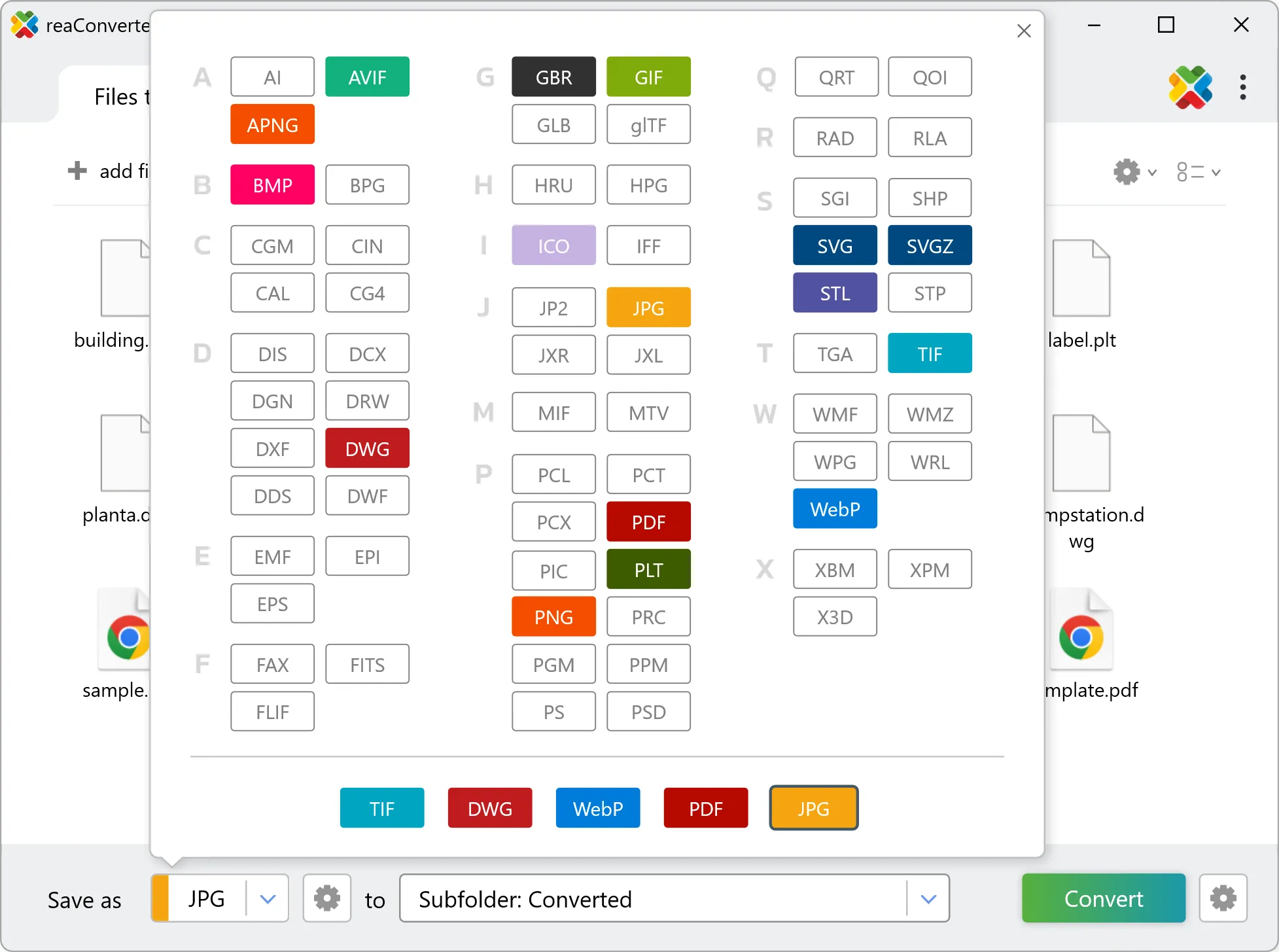
Select RAD as output format

4. Start HPGL to RAD conversion

Press the Convert button and reaConverter takes care of the rest. Processing time depends on file size and volume.

Start Conversion

After processing, find all your new .rad files in the output location. The log shows details for each conversion.


HPGL to RAD Converter

reaConverter offers the fastest, simplest solution for converting your HPGL files into RAD in seconds - all files processed on your PC for maximum privacy and speed.

Do more with your files

Converting HPGL files for use in a workflow? reaConverter offers many ways to process files, so you can customize them according to your requirements.

Our range of editing options includes auto-processing options such as auto-rotate, auto-crop, watermarking and more. Change Color Space, copy Metadata, set DPI, manage ICC Profile, control Bit Depth.

Image editing

User Reviews

Average User Rating:
Last updated on January 25, 2026
"reaConverter has become our go-to tool for converting HPGL plot files into high-resolution formats for review and documentation. It handles complex vector data with precision, preserving all design elements accurately. The ability to automate the process via command-line and Watch Folder means we can convert incoming plot files in real time, directly from our design software outputs. It’s a dependable, scalable solution that integrates effortlessly into our engineering workflow."
Thomas R.
Thomas R.
Hardware Design Engineer
"HPGL remains essential for legacy plotters and CAD workflows. For reliable, batch-friendly conversion, reaConverter is a top choice—just pair it with a vector editor (like Inkscape) if modifications are needed."
Matthew K. Jones
Matthew K. Jones
Satisfied Customer
"We deployed reaConverter across our department to standardize file formats for our archives. The command-line support and automation features integrated perfectly into our systems. Stellar performance and zero crashes—it just works."
David R.
David R.
IT Solutions Architect
"So simple! I just needed to convert a couple of files to another format, and for such a straightforward task, the online converter worked perfectly — delivering the files I needed in no time. Excellent service!"
Kenneth D. Carter
Kenneth D. Carter
Satisfied Customer
"I run a small design agency, and reaConverter has saved me countless hours. The batch processing is lightning-fast, and the ability to convert hundreds of files into different formats at once is a game-changer. Highly recommend!"
Mark T.
Mark T.
Satisfied Customer
"Creating marketing materials for various platforms requires multiple file versions from single sources. reaConverter's workflow automation lets us generate PNG, JPEG, and SVG variants from AI and PSD files simultaneously. The color profile management ensures brand consistency across all outputs, and the processing speed allows for last-minute changes without delaying deadlines."
Rebecca Turner
Rebecca Turner
Marketing Agency CEO

HPGL to RAD Conversion: FAQ

Can reaConverter convert HPGL to RAD?

Yes! reaConverter instantly converts .hpgl to .rad with perfect quality preservation. With its batch processing feature, you can convert multiple files at once in just a few clicks. You can even convert images directly from Windows Explorer using the right-click menu — fast and convenient.

Can I convert HPGL to RAD online?

If you only need to convert a few HPGL files to RAD format, feel free to try our free online free online HPGL to RAD converter — perfect for small batches with no installation needed!

How can I turn HPGL files into RAD on my computer?

The best way to change HPGLs to RADs on your PC is to install a quality piece of software, such as reaConverter. This software is extremely efficient in managing a wide range of batch files conversions, including conversion from HPGL to RAD.

How can I automate HPGL to RAD files conversion?

reaConverter supports all the most useful automation features such as right-click сonversion and Watch Folders for the most efficient automated files conversion in any software of this type.

Is there a way to convert HPGL files to RAD using the command prompt?

reaConverter provides full access to all its features via Windows command line, including a high-performance command-line hpgl to rad converter for batch processing.

What else can I do with reaConverter?

Convert RAW formatsConvert PDFAdd watermark on imageSet file dateConvert DICOM images

Find out more

Get advanced software for file conversion, processing, and editing, giving you complete, precise control over your work.
reaConverter software
