
Convert BN to AI

Convert BN to AI without quality loss. reaConverter gives you full control over resolution, compression, and output settings.

Batch BN to AI conversion doesn't have to be complicated. reaConverter processes entire folders with consistent quality settings. Works offline with no internet required — convert anywhere, anytime.

Convert

How to Convert Multiple BN Files to AI?

1. Download and Install reaConverter

reaConverter installs quickly on any Windows PC. No dependencies, no bloatware — just a clean setup that's ready to use immediately.

2. Load your BN files

Load your BN files into reaConverter. You can add individual files or point to folders, and the software will queue everything automatically.

Select BNs from a folder or drag-and-drop them directly into the reaConverter window.

Load your BN files into reaConverter

3. Select AI as output format

Choose AI for output and set your save location. reaConverter lets you customize quality and apply edits before conversion.
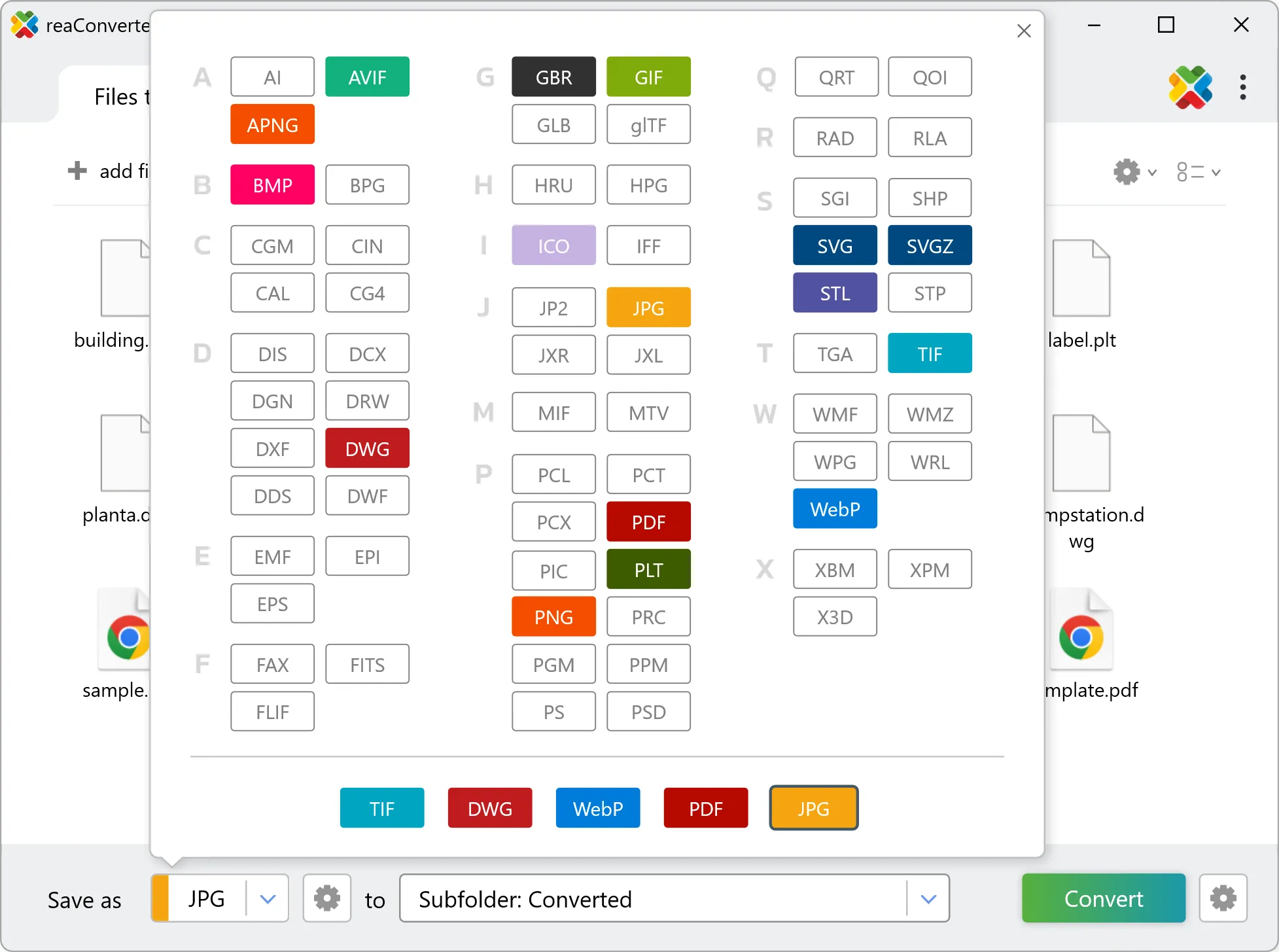
Select AI as output format

4. Start BN to AI conversion

Press the Convert button and reaConverter takes care of the rest. Processing time depends on file size and volume.

Start Conversion

After processing, find all your new .ai files in the output location. The log shows details for each conversion.


BN to AI Converter

reaConverter offers the fastest, simplest solution for converting your BN files into AI in seconds - all files processed on your PC for maximum privacy and speed.

Do more with your files

Converting BN files for use in a workflow? reaConverter offers many ways to process files, so you can customize them according to your requirements.

Our range of editing options includes auto-processing options such as auto-rotate, auto-crop, watermarking and more. Change Color Space, copy Metadata, set DPI, manage ICC Profile, control Bit Depth.

Image editing

User Reviews

Average User Rating:
Last updated on January 25, 2026
"Client demanded PNGs but sent AI files ‘because you have Adobe, right?’ Jokes on them—reaConverter handled it while I sipped my coffee."
Olivia M.
Olivia M.
Designer
"This software just works! My old laptop can’t handle Photoshop, but reaConverter flies through conversions without breaking a sweat. Wi-Fi gone? Still strong!"
Robert Williams
Robert Williams
Happy User
"Rare software that actually does it all! Converts anything, beautiful interface, and never lets me down. A must-have!"
Henry R.
Henry R.
Happy User
"For cross-platform compatibility, JPEG remains the gold standard. reaConverter’s precision conversions ensure perfect results every time, whether for presentations, websites, or client deliverables."
Paul Baker
Paul Baker
Happy User
"An ultra-fast solution for minimizing file sizes. The entire conversion process takes just 3 minutes!"
Logan B.
Logan B.
Satisfied Customer
"I use the online converter — it’s quick and hassle-free!"
Jian Wong
Jian Wong
Happy Online User

BN to AI Conversion: FAQ

Can reaConverter convert BN to AI?

Yes! reaConverter instantly converts .bn to .ai with perfect quality preservation. With its batch processing feature, you can convert multiple files at once in just a few clicks. You can even convert images directly from Windows Explorer using the right-click menu — fast and convenient.

Can I convert BN to AI online?

If you only need to convert a few BN files to AI format, feel free to try our free online free online BN to AI converter — perfect for small batches with no installation needed!

How can I turn BN files into AI on my computer?

The best way to change BNs to AIs on your PC is to install a quality piece of software, such as reaConverter. This software is extremely efficient in managing a wide range of batch files conversions, including conversion from BN to AI.

How can I automate BN to AI files conversion?

reaConverter supports all the most useful automation features such as right-click сonversion and Watch Folders for the most efficient automated files conversion in any software of this type.

Is there a way to convert BN files to AI using the command prompt?

reaConverter provides full access to all its features via Windows command line, including a high-performance command-line bn to ai converter for batch processing.

What else can I do with reaConverter?

Change format settingsChange DPIConvert DICOM filesChange photo sizeConvert Gerber files

Find out more

Get advanced software for file conversion, processing, and editing, giving you complete, precise control over your work.
reaConverter software
